
Family Claus – Christmas Elf Folder Icons for Windows 11
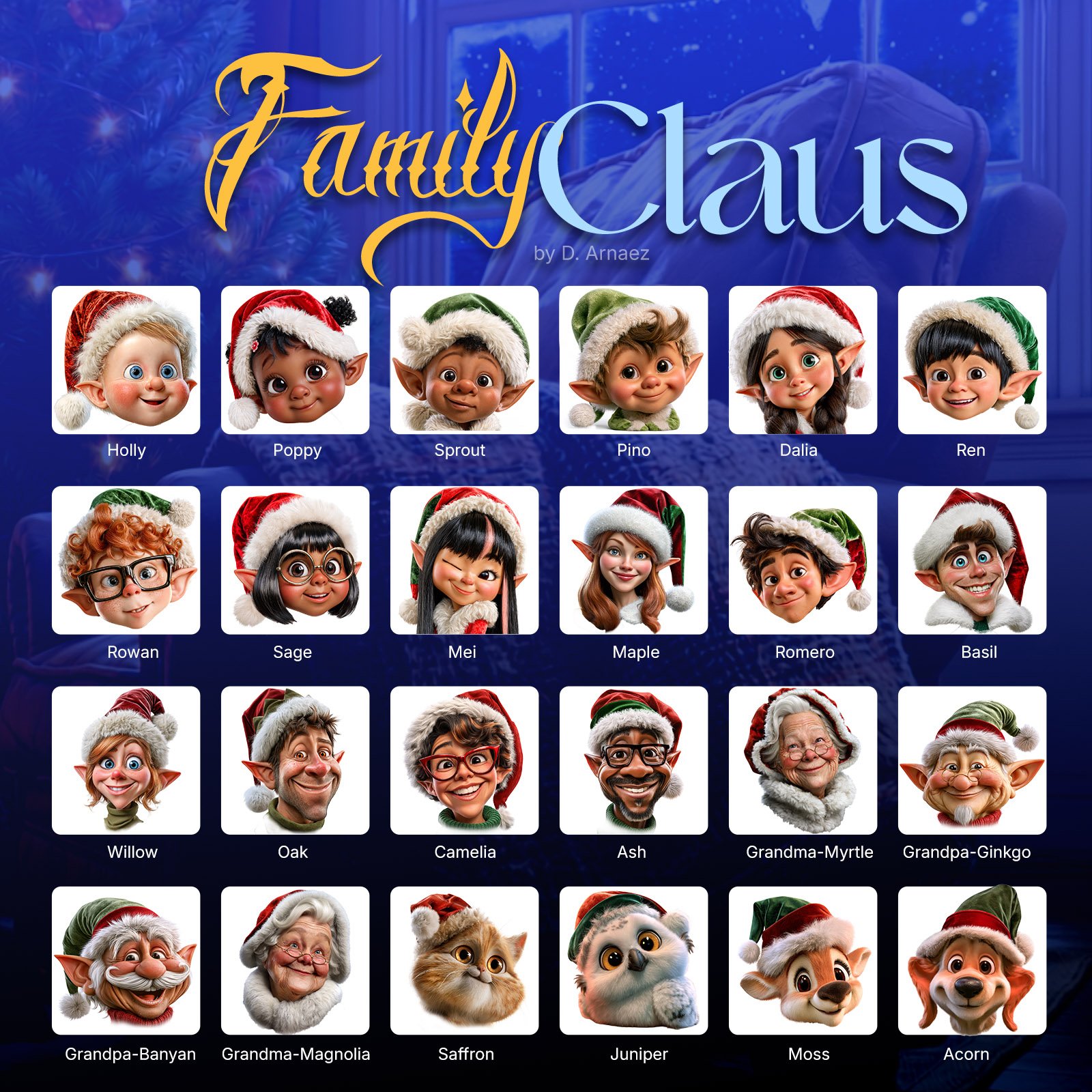
A Christmas elf for everyone in your family. Family Claus gives each person’s folder its own cheerful elf: babies, kids, teens, parents, grandparents, and even the family pets.
Elves of every age, look and skin tone, with glasses, freckles, curls and braids, so everyone finds the one that looks like them. Drag and drop them onto your folders with ThemeControl, our free app, or use Windows’ own settings. PNG versions are included too, so each person can use their elf as their Windows account picture.
Christmas folder icons for the whole family
Sharing a PC at home? Give every family member a folder with their own Christmas elf. The kids find their homework and games at a glance, and the whole desktop is ready for the holidays.
Meet the family
- Babies: Holly, Poppy, Sprout and Pino
- Kids: Dalia, Ren, Rowan and Sage
- Teens: Mei, Maple, Romero and Basil
- Parents: Willow, Oak, Camelia and Ash
- Grandparents: Grandma Myrtle, Grandma Magnolia, Grandpa Ginkgo and Grandpa Banyan
- Pets: Saffron the cat, Juniper the owl, Moss the fawn and Acorn the puppy
Every elf is friendly, colorful and full of personality, with Santa hats in red and green.
Great for
- Each family member’s folder on a shared PC
- Kids’ school, games and drawings folders
- Christmas photos, gift lists and recipes
- Desktop shortcuts to the family’s favorite apps
How to use them
With ThemeControl (free): open the Other Icons tab, drag a folder in, drag an elf next to it and click Apply icon. Reset puts the old icon back anytime.
Without ThemeControl: right-click a folder > Properties > Customize > Change Icon, and pick an elf. The included PDF guide shows both ways step by step.
What’s included
- The Family Claus elf icons in .ico format, sharp from small to extra large
- Step-by-step guide (PDF)
- PNG versions at 448 × 448, the exact size Windows uses for account pictures, so they stay sharp on the sign-in screen
Use your elf as your Windows account picture
The PNG versions are made at 448 × 448 pixels, the exact size Windows 11 uses for the account picture on the sign-in screen. No stretching, no blur. Go to Settings > Accounts > Your info > Choose a file, and pick your elf.
Requirements
- Windows 11 (64-bit)
- Optional: ThemeControl (free) for drag-and-drop
Frequently asked questions
Do I need ThemeControl? No. ThemeControl makes it a drag-and-drop job, but you can also use Windows’ own folder settings.
Will my folders keep the icons if I change my icon theme? Yes. Icons set with ThemeControl’s Other Icons stay on your folders when you change themes.
Do the icons work with Claus 11? Yes, they’re made to match. For the full Christmas look, see the Claus 11 Christmas Bundle: icons, Santa screensaver, cursors and wallpaper.
Only logged in customers who have purchased this product may leave a review.
Related products
$13.00
$2.00
$5.00
$13.00
$5.00

Reviews
There are no reviews yet.